

If your Skytech fireplace remote is not working, start with the batteries, receiver switch position, and pairing instructions for your model. These checks can help narrow down whether the problem involves the handheld remote, the receiver, or the fireplace itself.
Watch our troubleshooting video below, then follow the steps that apply to your system. This guide focuses on Skytech remotes with a separate receiver box and an ON/REMOTE/OFF switch. Button sequences and reset features vary, so keep your model’s instructions nearby.
Before You Start
Find the model numbers on your transmitter and receiver. The transmitter is the handheld remote; the receiver is the component connected to the fireplace controls. You can find model-specific instructions through Skytech’s support resources.
Let the fireplace cool before accessing the receiver or changing batteries. Use only the access points described in your fireplace manual, and leave wiring changes, gas-valve work, and internal repairs to a qualified fireplace technician.
If you smell gas, stop troubleshooting. Leave the area without operating electrical switches, and contact your gas supplier or emergency services from a safe location.
1. Locate the Receiver and Check Its Settings
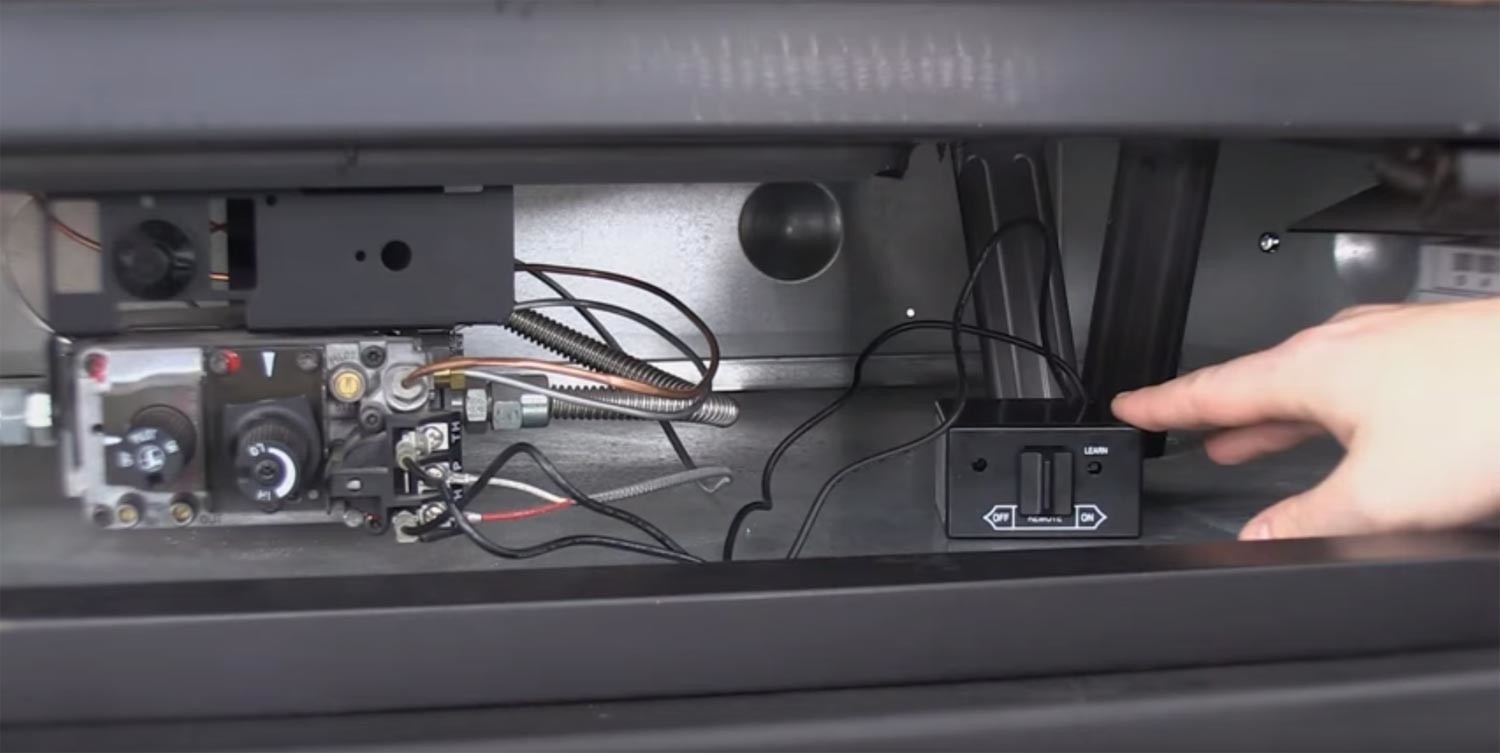
Depending on the installation, the receiver may sit behind the fireplace’s lower access panel, near the hearth, or in a wall-mounted box. Check your fireplace manual if you are unsure where to find it.
On receivers with a three-position switch, the settings serve different purposes:
- ON: Calls for the fireplace to operate without a command from the handheld remote.
- REMOTE: Allows the receiver to respond to the paired transmitter.
- OFF: Turns off operation through the receiver.
For normal remote operation, the receiver should be in REMOTE. Other fireplace switches must also be in the positions specified by the appliance manufacturer.
For a standing-pilot fireplace, confirm that the pilot is lit and the gas-control knob is in its normal operating position according to the fireplace instructions. An intermittent-pilot system works differently, so do not assume every fireplace should have a continuously burning pilot.
2. Check the Batteries and Receiver Power
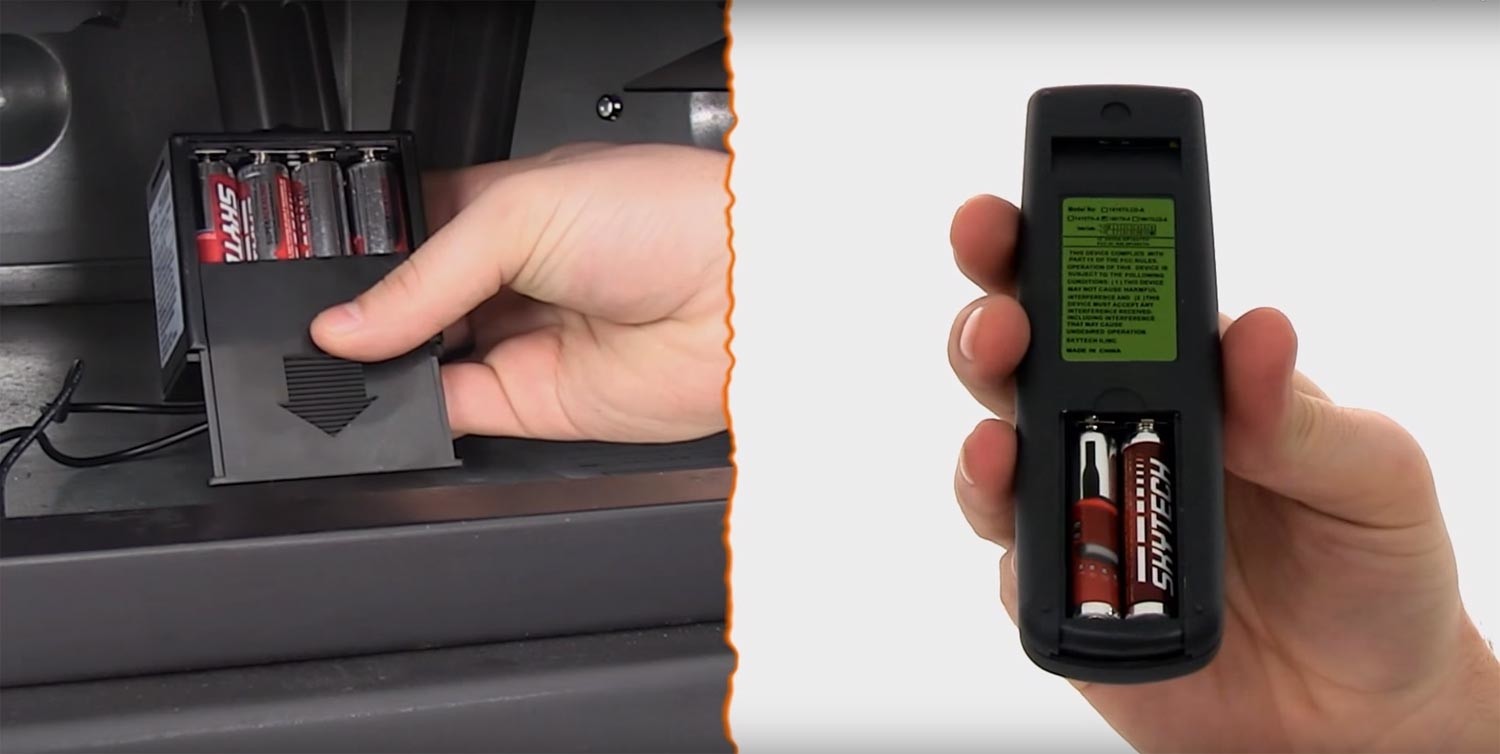
Check both parts of the system. Fresh batteries in the handheld remote will not solve a power problem in a battery-operated receiver.
- Set the receiver to OFF before changing its batteries.
- Use fresh batteries of the type specified for each device, and match the positive and negative markings.
- Inspect the battery compartments for leakage, corrosion, or damaged contacts.
- If your receiver plugs into an outlet, confirm that it is connected to a working power source.
If you find significant corrosion or damaged contacts, stop and ask the manufacturer about service or replacement. New batteries alone may not restore a damaged device.
Return the receiver to REMOTE and try the handheld control from nearby. If it still does not respond, continue with the receiver test.
3. Test the Fireplace at the Receiver
With the fireplace ready to operate according to its owner’s manual, briefly move the receiver switch to ON. Stay with the appliance during the test.
- If the burner starts: The fireplace responds to the receiver’s manual command. Return the switch to REMOTE and continue checking transmitter communication.
- If the burner does not start: The result does not prove that the receiver is broken. Fireplace settings, ignition, power, connections, or other appliance components may need attention. Return the switch to OFF and contact a qualified fireplace technician if the owner’s manual checks do not resolve it.
Pairing the handheld remote will not correct a gas-supply or ignition problem. Avoid repeatedly resetting the remote if the fireplace cannot operate through the receiver’s manual ON setting.
4. Pair the Remote and Receiver
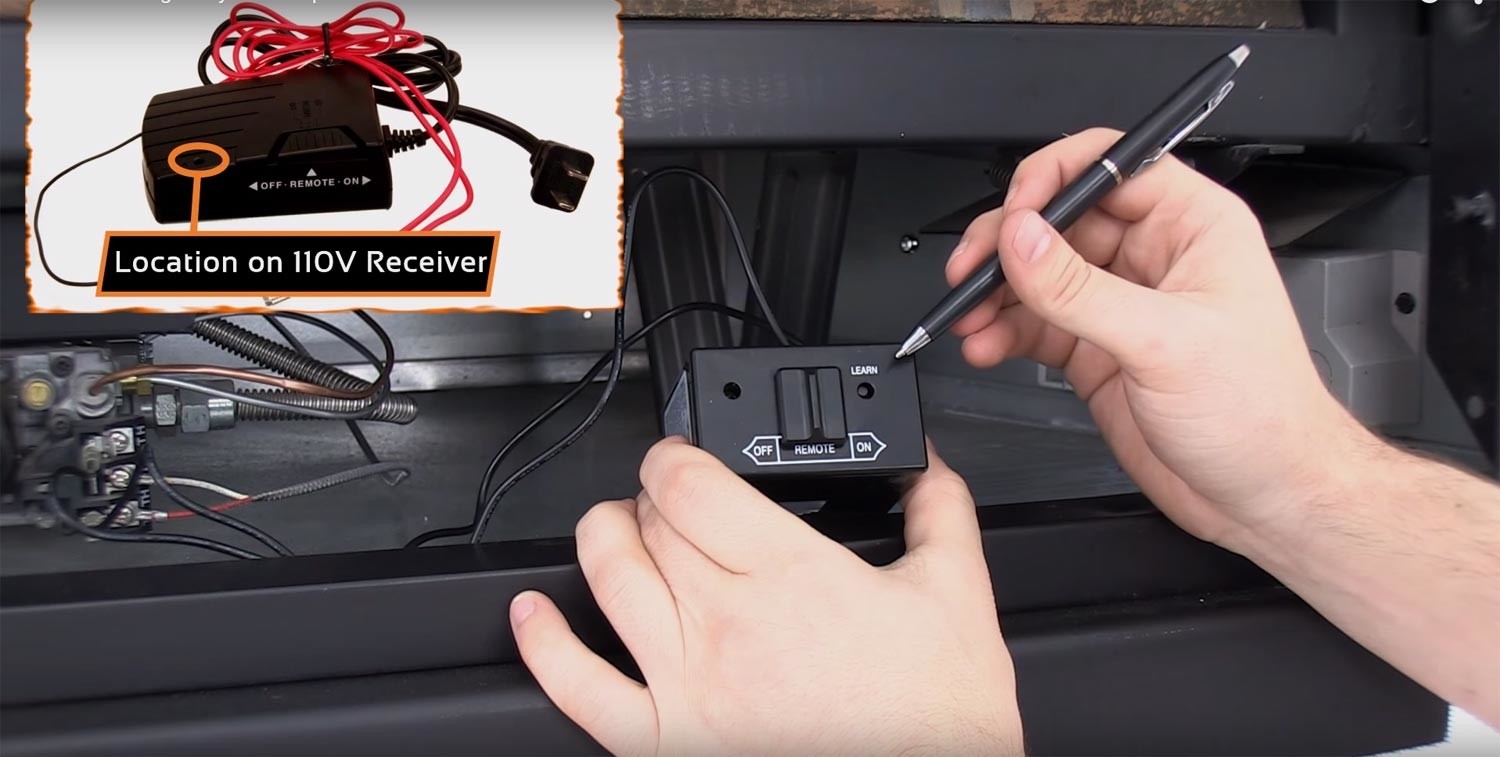
The learn function allows a compatible receiver to recognize the transmitter’s security code. It may be needed during initial setup, after a transmitter replacement, or as directed during troubleshooting.
For models covered by Skytech’s 1001-A series and 3301/3301P troubleshooting guides:
- Place the receiver switch in REMOTE.
- Press and release the receiver’s LEARN button.
- Within five seconds, press the transmitter button specified for your model: ON for the 1001-A series troubleshooting sequence, or MODE for the 3301/3301P sequence.
- Listen for the receiver’s confirmation beeps.

Use your exact model’s instructions if its buttons or pairing sequence differ. Keep the fireplace ready for operation because a command sent during pairing may start the burner.
After pairing, test both ON and OFF from the handheld remote. Confirmation beeps indicate that the receiver accepted the code; checking actual operation confirms whether the fireplace responds as expected.
5. Clear Stored Codes Only if Your Model Supports It

Some Skytech receivers allow stored transmitter codes to be cleared when learning does not work. This is not a universal reset procedure for every Skytech remote.
For the Skytech 1001-A: Place the receiver switch in REMOTE, hold LEARN for 10 seconds, and release. Three long beeps confirm that the stored codes have been cleared. Then repeat the pairing process.
Clearing memory removes previously learned transmitter codes. For other models, follow the receiver’s own manual rather than assuming the same hold time or beep pattern applies. If it does not respond as described, contact Skytech support before attempting further resets.
When Troubleshooting Does Not Restore Operation
Before ordering a replacement, gather the fireplace model number, transmitter model number, receiver model number, and the results of your checks. Note whether the burner operates with the receiver set to ON, whether pairing produces a response, and whether the handheld remote can turn the burner both on and off.
These details help our product specialists assess replacement options. A receiver that fails the manual ON test may require fireplace service before a remote replacement makes sense.
Use our fireplace remote control replacement guide to compare options for your existing system. Confirm compatibility with both the receiver and the appliance controls before purchasing a transmitter or complete kit.
Frequently Asked Questions
Why does my Skytech receiver keep beeping?
A brief pairing confirmation is different from a repeating beep pattern. Some Skytech receivers use repeated beeps to signal overheating or a loss of communication. Check the beep pattern against your model’s manual, and stop using the fireplace if it indicates a safety shutdown. Do not repeatedly reset it without addressing the cause.
Why does the remote work in ON mode but not thermostat mode?
Thermostat mode responds to the temperature setting rather than a continuous ON command. Check the displayed room temperature, set temperature, and selected mode using your model’s instructions. If the settings should call for heat but the burner does not respond, contact support for model-specific troubleshooting.
Can I replace just the Skytech handheld remote?
Sometimes, but the replacement transmitter must be compatible with the existing receiver. Confirm the model numbers before ordering. If troubleshooting has not established whether the transmitter or receiver has failed, replacing the handheld remote alone may not solve the problem.
Final Thoughts
Checking power, switch positions, and model-specific pairing instructions gives you a useful starting point when a Skytech fireplace remote stops responding. The receiver’s manual ON test can also help determine when the fireplace itself needs attention.
For additional resources, visit our Fireplace Remote Controls Help Center. Have your transmitter and receiver model numbers ready when asking our team for help finding compatible replacement options.